Skip to content

For law enforcement agencies that run Internal Affairs and use-of-force review

A fair, defensible Internal Affairs process for every agency

Most agencies run Internal Affairs without dedicated staff, and a missed deadline, scattered evidence or an uneven process can undo a good-faith investigation. CoordinatedIA guides each case through a best-practice process, organizes the evidence into a cited timeline and tracks every deadline, so a small agency can investigate with the care of a large one.
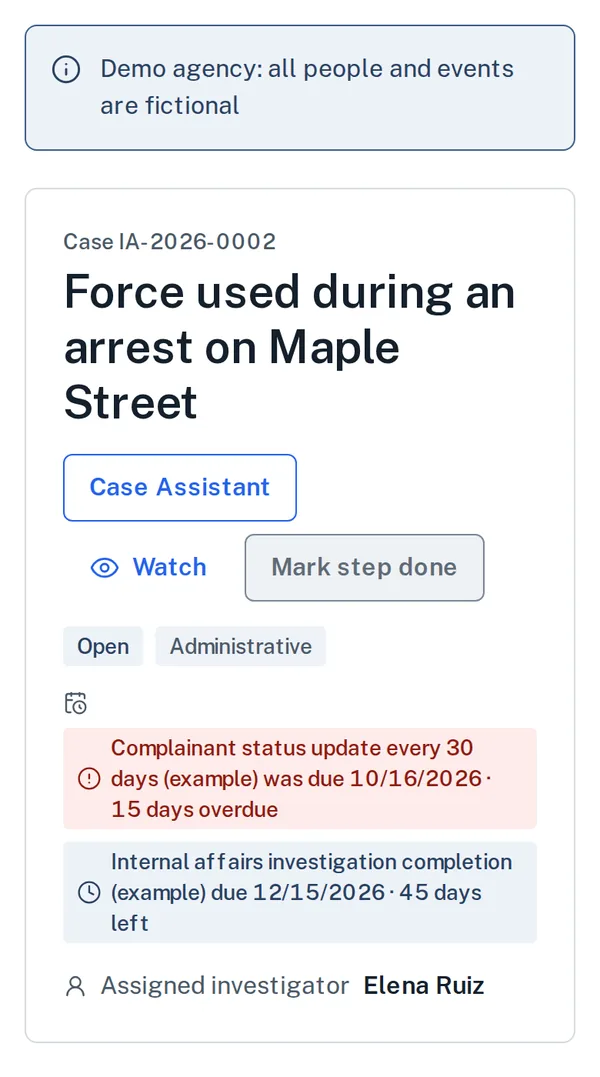
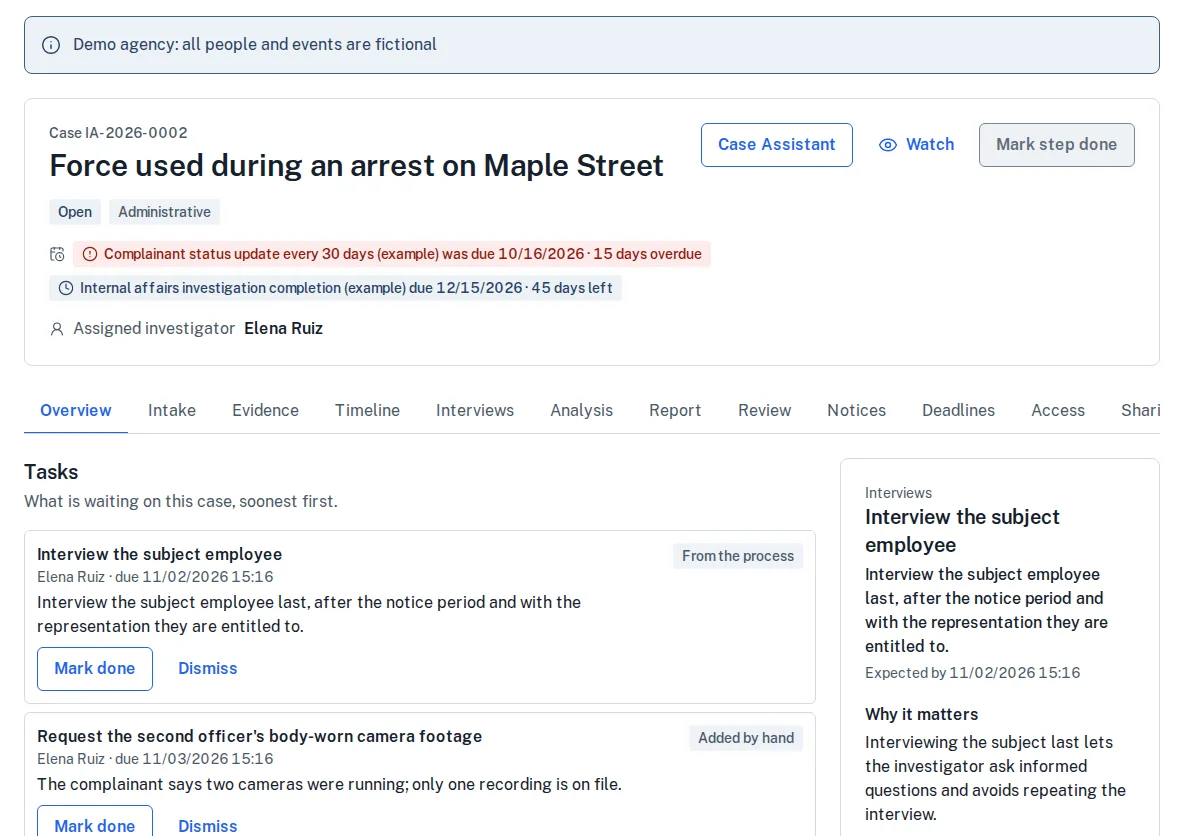
A case workspace for a force complaint: the case number and title, its status, two deadline chips showing one overdue and one with 45 days left, the assigned investigator, the case tabs, a task list, and a guidance panel naming the next step and why it matters.

The case workspace of the City of Bluestem Police Department, a demonstration agency. Every person and event is fictional.

  • Deadlines, tracked

    Clocks from state law, policy and the labor contract, computed from rule sets your agency adopts. A starter set for Kansas, the first market.

  • Evidence, cited

    A timeline in which every entry names its source recording or report, with each camera's clock offset shown.

  • People, deciding

    Every finding is a person's. Ai is off until you turn it on, and its work waits for a person to accept it.

What must happen next, and by when?

Every clock on every case, in one list

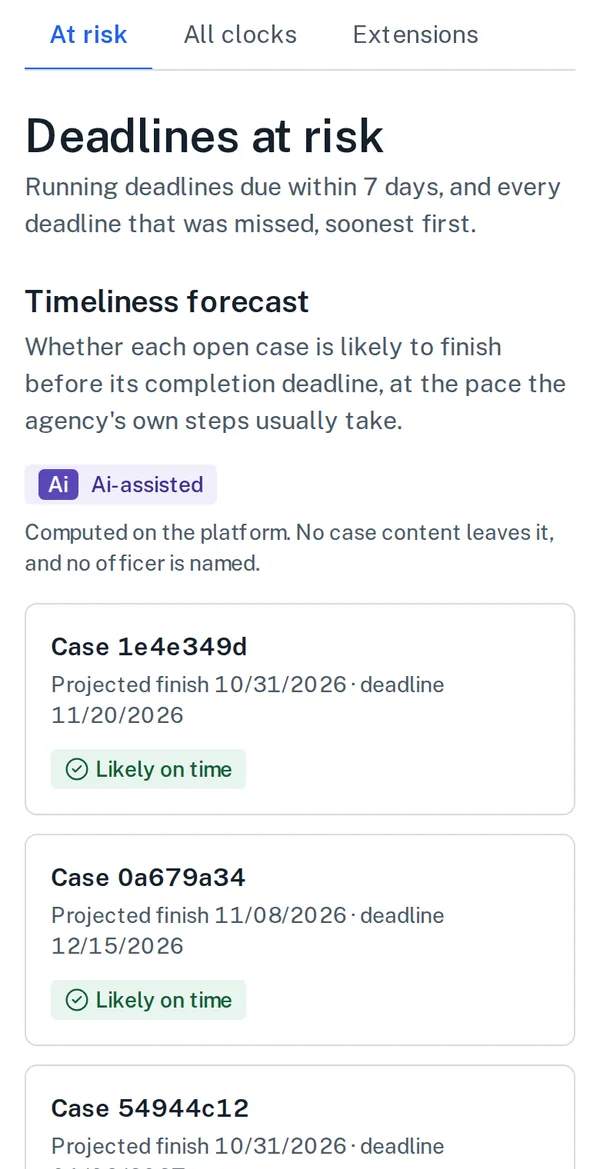
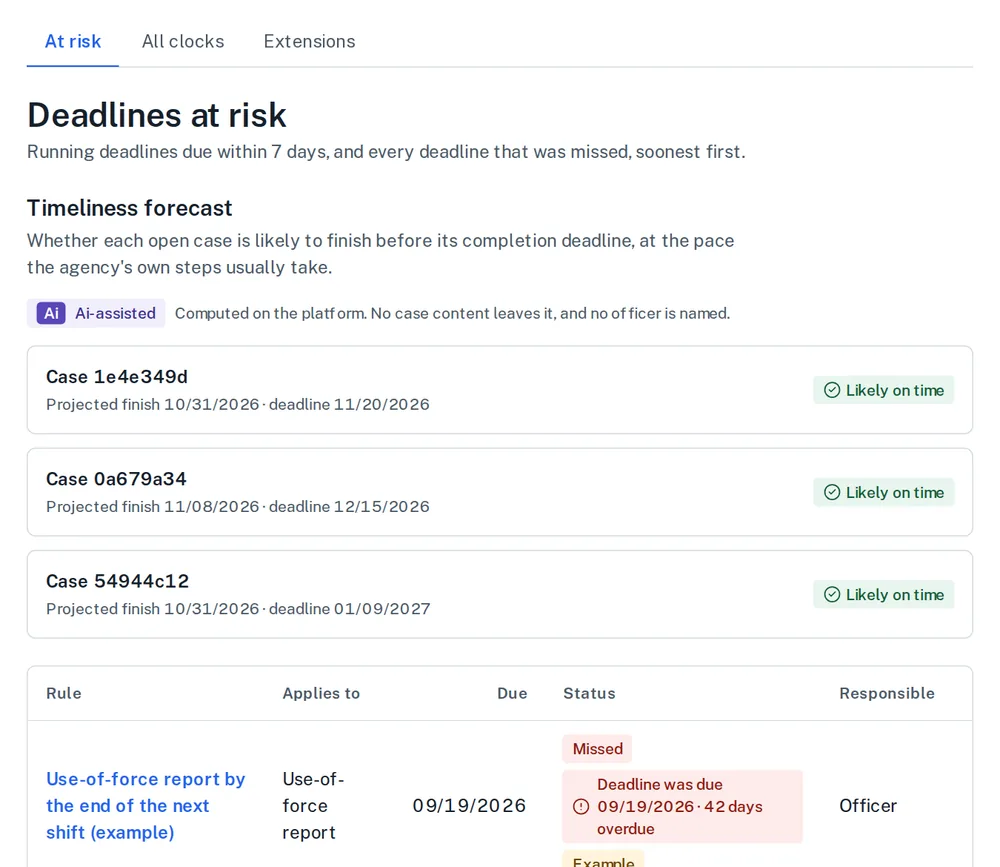
Deadlines come from state law, agency policy, the labor contract and accreditation standards. Each is computed from a rule set your agency adopts and shown on the case, so the investigator sees the next step and the date it is owed.
  • Rule sets are versioned by effective date and cite their source. Nothing is built in.
  • Alerts escalate before a deadline passes, and an at-risk list shows every open clock, soonest first.
  • Written extensions and tolling are applied, and the officer and their representative see the clocks that apply to them.
The deadlines at risk page: tabs for at risk, all clocks and extensions, a timeliness forecast per open case, and a table of rules with the date each is due, its status such as Missed with the days overdue, and who is responsible.
The at-risk list of the demo agency. Rules marked (example) are sample rules for the demonstration; an agency adopts its own.

What does the evidence actually say?

A timeline in which every entry names its source

The investigator builds one chronology of the incident from the evidence. Anyone who reads the report can check each statement against the record it cites.
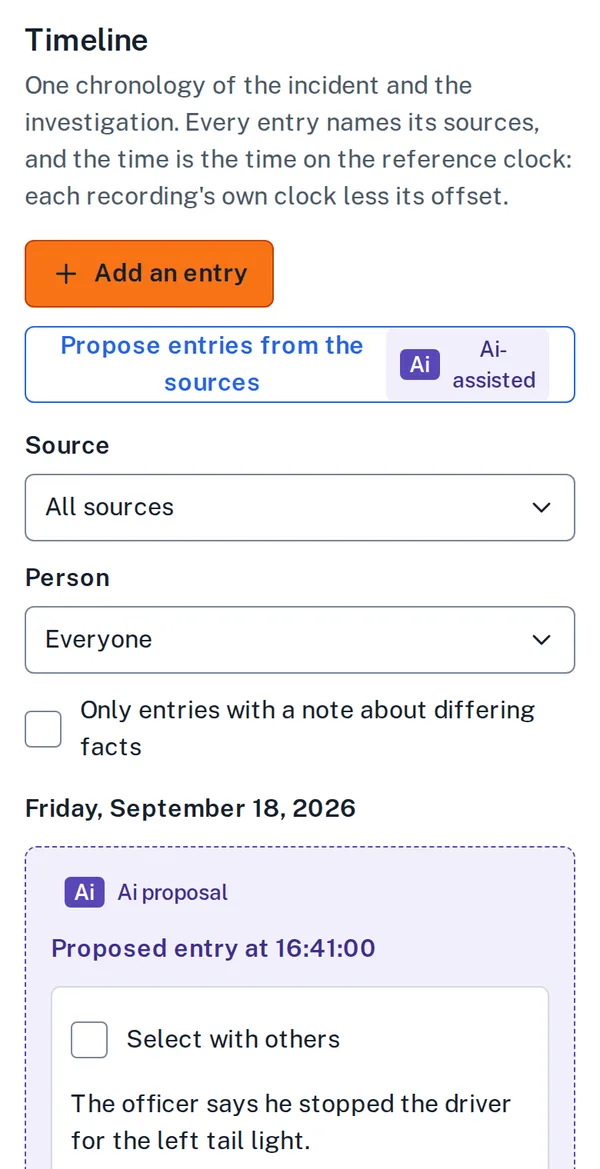
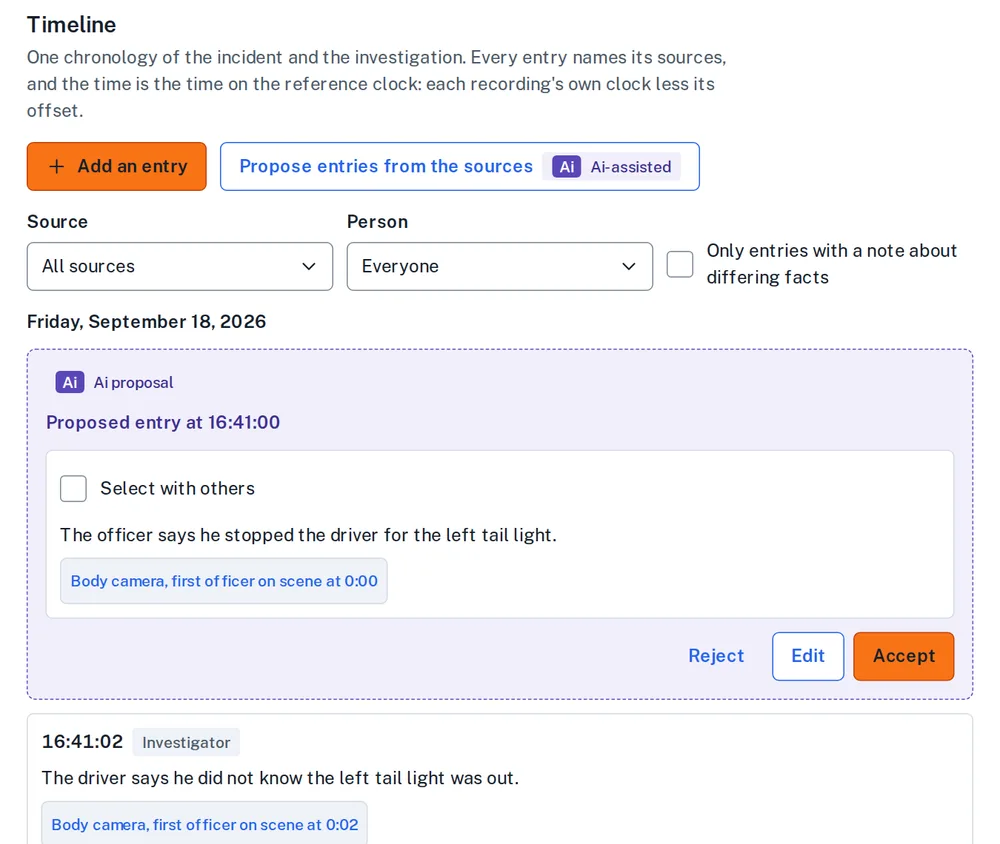
  • Each entry links to the recording, report or record it came from, and to the moment in it. Two cameras with different clocks show their offset.
  • Where the agency has turned Ai on, proposed entries sit beside the investigator's own with a dashed border and the Ai label. A person accepts, edits or rejects each one.
  • Differences between sources are noted as facts for the investigator. The platform never judges credibility.
The cited timeline of a case: an Ai proposal with a dashed border offers a proposed entry with its source recording and the buttons Reject, Edit and Accept, above an entry the investigator wrote, each citing the body-camera recording and the moment in it.
The cited timeline of a force complaint in the demo agency. The Ai proposal waits for a person; nothing enters the record until it is accepted.

Who decides, and on what record?

People make every finding

The investigator certifies the report. It goes to each reviewer in the chain of command, who concurs or dissents and says why. The authorized decision-maker then enters findings using the agency's own definitions.
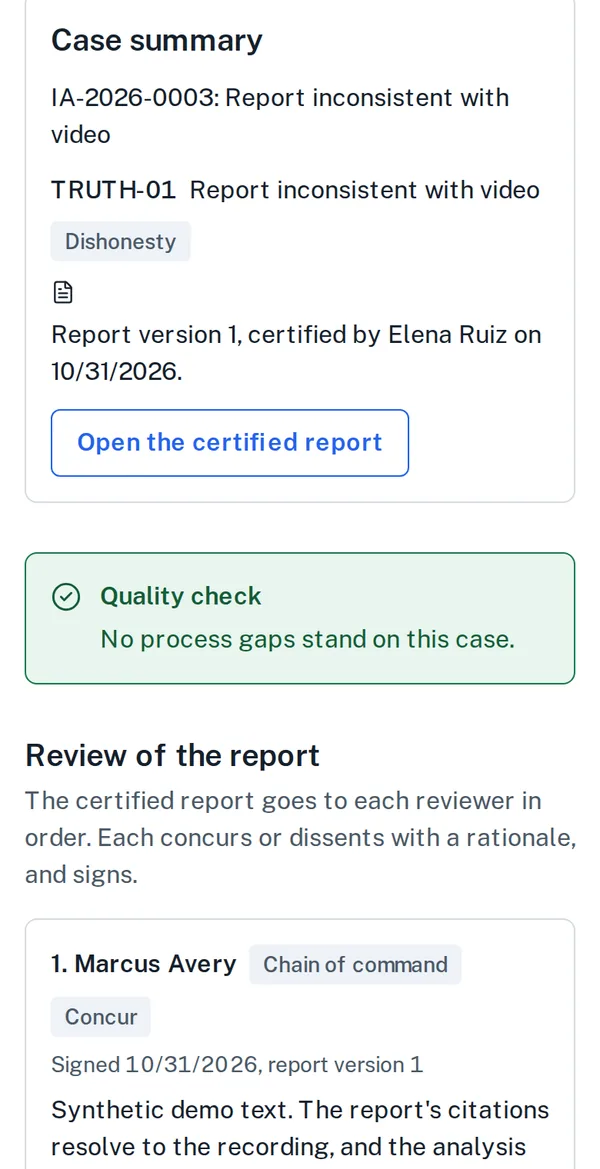
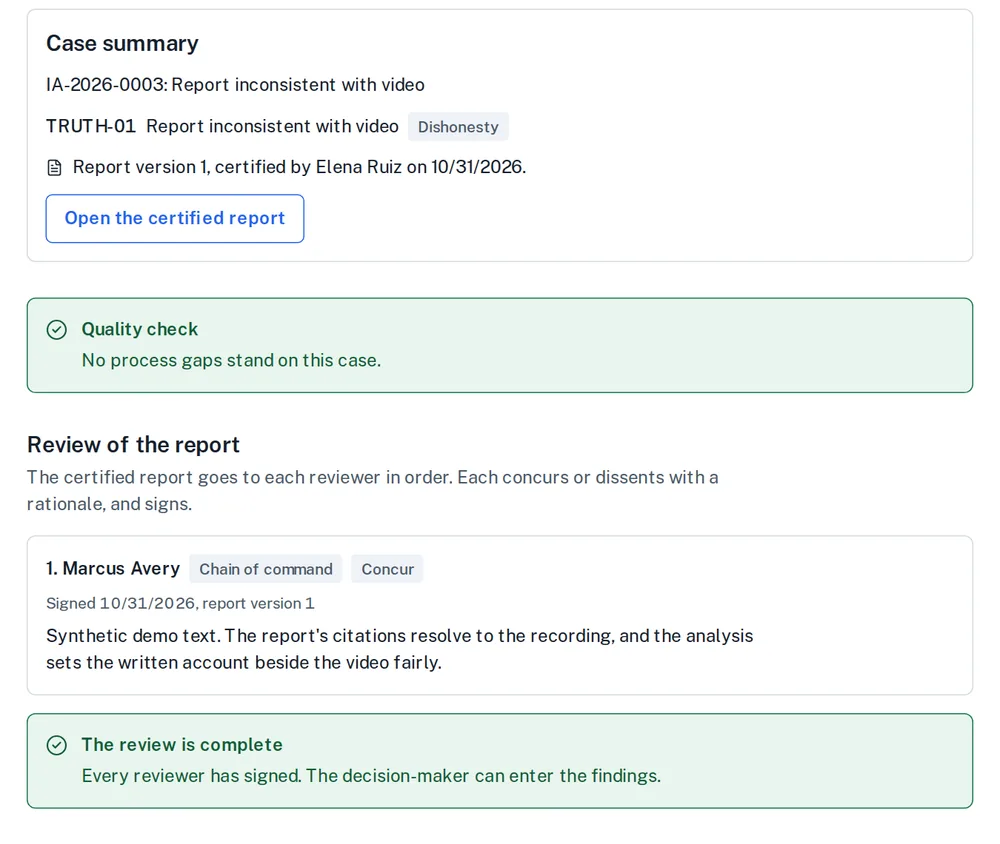
  • A quality check measures the case against the best-practice checklist before review and lists every gap.
  • The agency's discipline matrix is on screen for consistency. The platform does not recommend a finding or discipline.
  • Signing asks the signer to confirm their identity again, and the record shows who signed what.
The review step of a case: a case summary with the certified report, a quality check reporting no process gaps, and the chain-of-command review where a named reviewer concurs and records a rationale and signature.
The review step in the demo agency: the certified report, the quality check and the first reviewer's concurrence, with the reason.

How is the function performing?

Counts for the agency, never scores for an officer

Leaders see how the work is going without the platform judging the people in it.
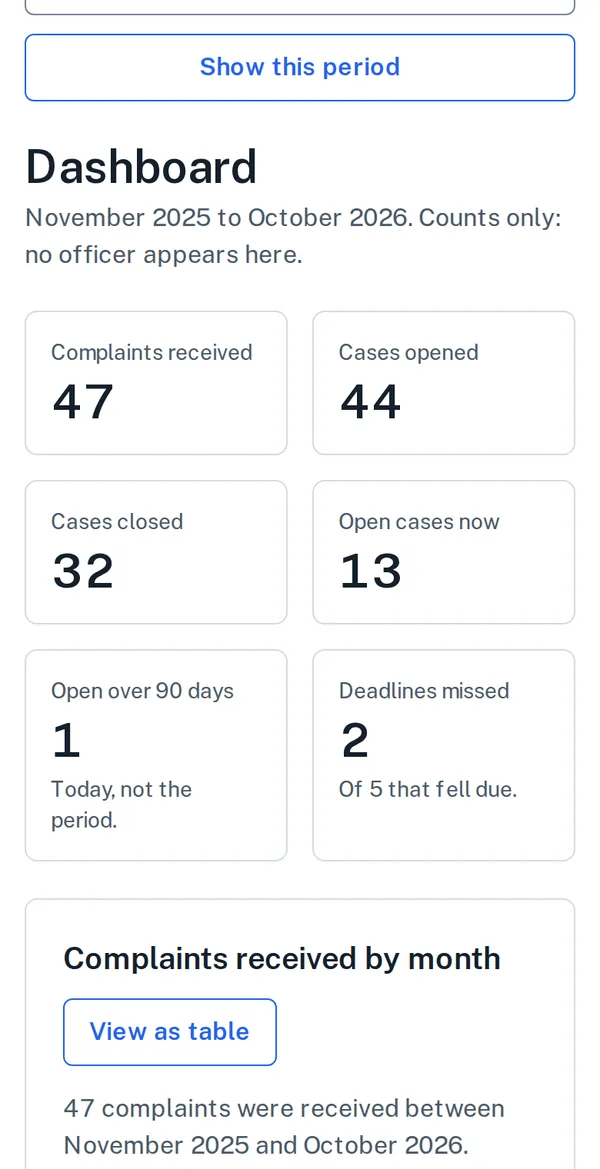
  • Caseload, case age, deadline compliance and outcomes over any period, with a table version of every chart.
  • The annual statistics report, Kansas's bias-based policing report to the Attorney General and accreditation reports come from the same record.
  • Early-intervention alerts are counts against thresholds the agency sets, reviewed by a supervisor. No page ranks or colors an officer.
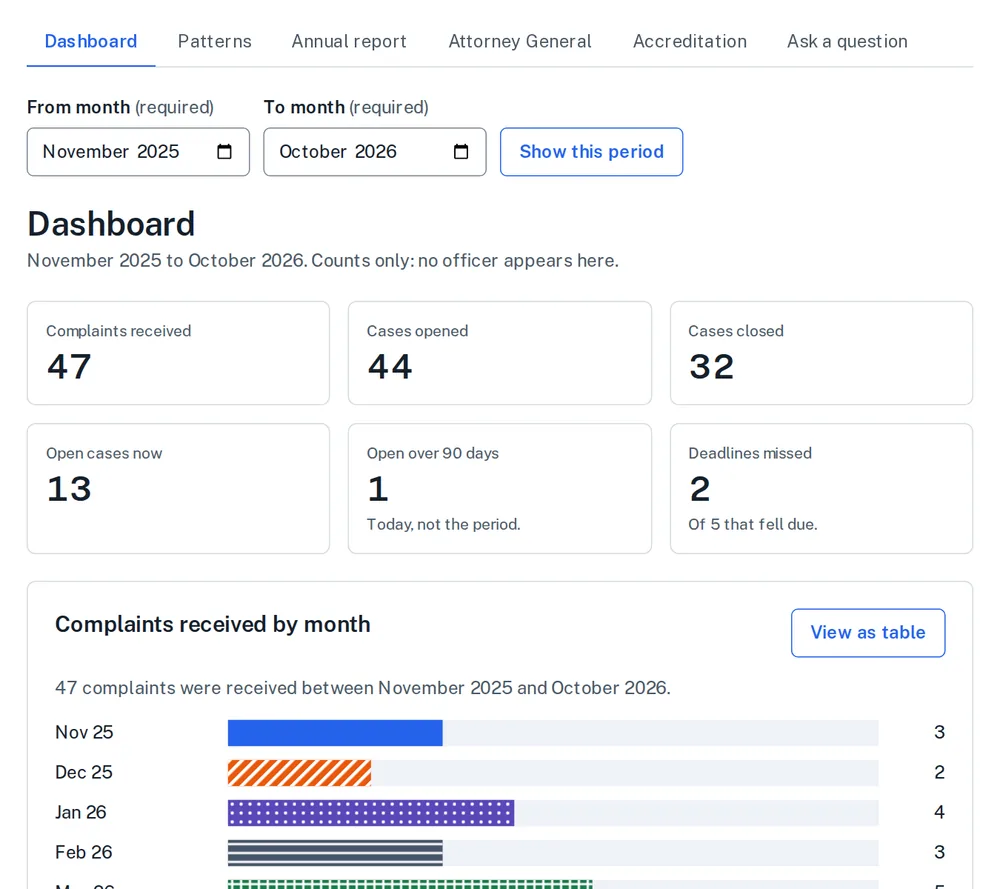
The agency dashboard: six count tiles for complaints received, cases opened and closed, open cases, cases open over 90 days and deadlines missed, then monthly bar charts with a View as table button on each. The page states that it shows counts only and no officer appears.
The dashboard of the demo agency. It shows counts only, and no officer appears on it.

Who sees what

One case record, and a recorded view of it for each person with a part in it

Nobody sees more than their role allows, access is granted case by case, and every view is logged where the agency can read it.

At the center

One case record

The evidence, the timeline, the clocks and the decisions, in one place and in one version.

The investigator

Works the whole case: evidence, timeline, interviews and the report, from the cases assigned to them.

The officer and representative

See the notices, deadlines and evidence the officer is entitled to, when the law or the labor contract says they are.

The complainant

Sees the status of their complaint in plain language and can add information. No account is required.

Counsel

Sees the legal case file for the cases they are granted, and nothing else.
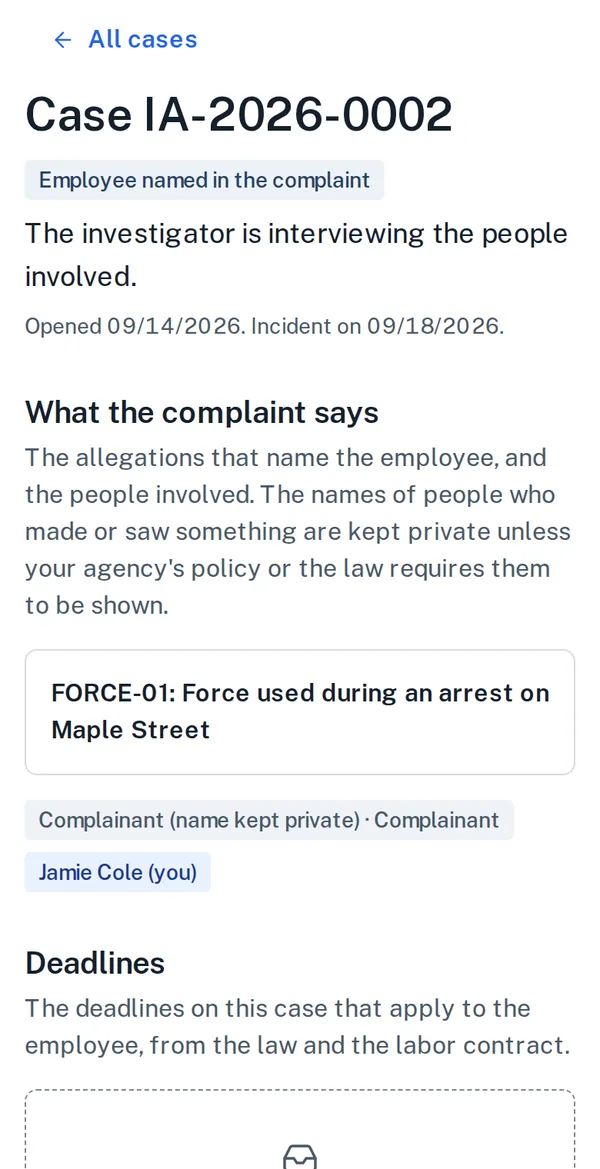
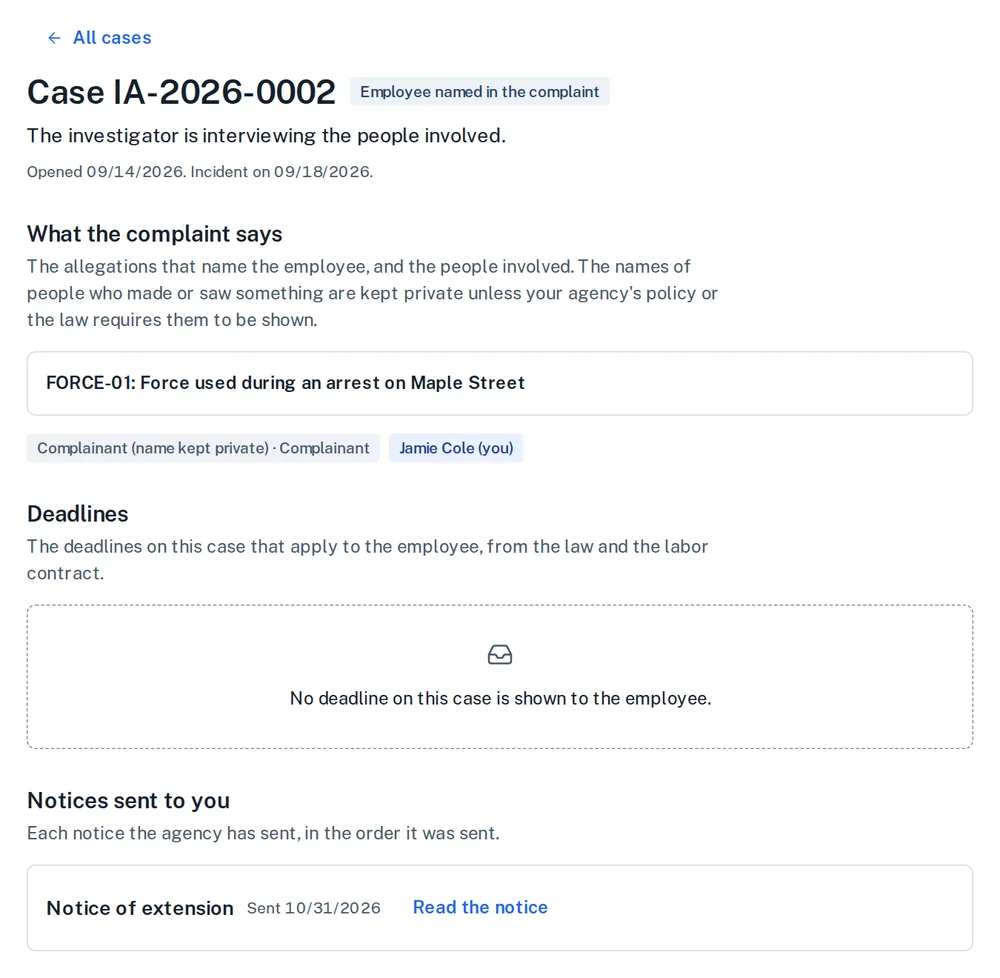
What an officer sees of a case about them: the allegation that names the employee, the people involved with names kept private, the deadlines that apply to the employee, the notices sent to them with their dates, and the interview scheduled with the union representative.
An officer's view of a case about them: the allegation, the notices sent to them and an interview scheduled with their representative. Names of people who made or saw something stay private unless policy or law says otherwise.
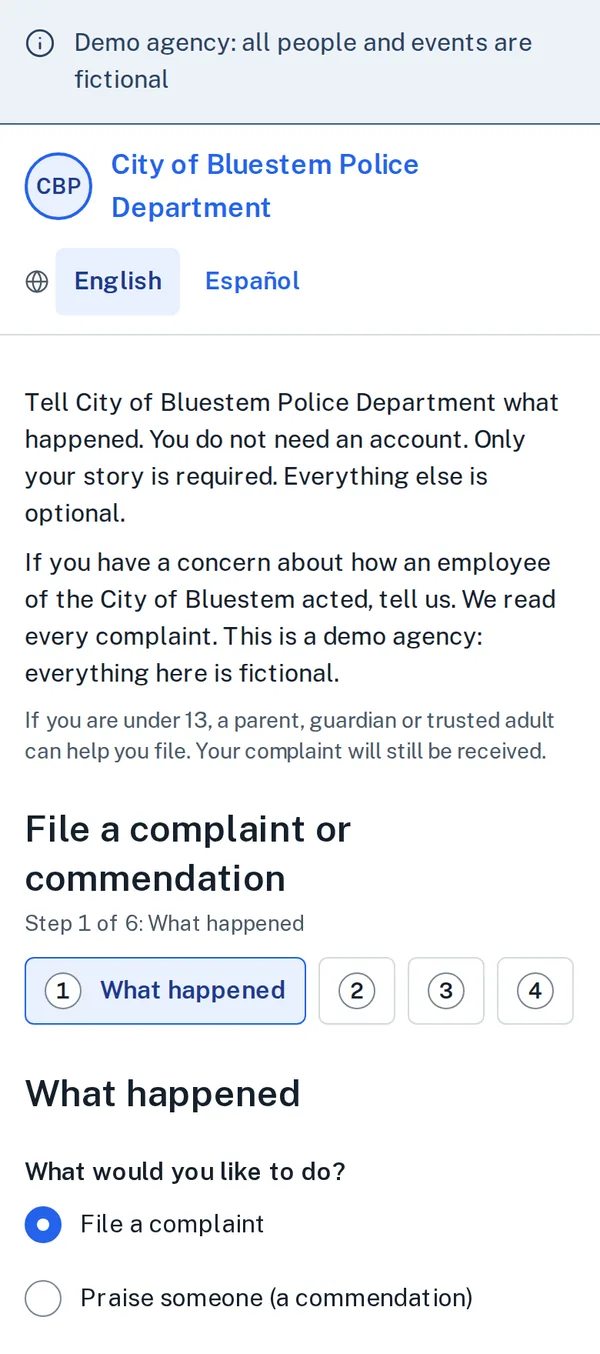
The public complaint portal on a phone: the agency's name, a language switch between English and Spanish, a plain statement that no account is needed, and the first of the filing steps, where the person chooses to file a complaint or a commendation.
A complainant files from a phone, with no account, in the languages the agency offers.

Try the public complaint portal of the demo agency (every person and event in it is fictional).

What is in it

Nine services on one record

From the first complaint to the last post-closure duty. Every module works without Ai.

  1. 1. Intake

    Public complaint portal, internal intake, triage and classification

  2. 2. Investigation

    Case management, evidence hub, cited timeline, interviews, policy compliance review, investigative report, compelled statement protection

  3. 3. Deadline assurance

    Deadlines and rules

  4. 4. Use of force

    Use-of-force reporting and review

  5. 5. Stakeholder coordination

    Officer and representative access, complainant communications, legal case file, oversight access, notices

  6. 6. Adjudication and records

    Review and adjudication, early intervention, disclosure and records, integrity reporting

  7. 7. Policy and knowledge

    Policy library, agency knowledge, case assistant

  8. 8. Oversight and insight

    Reporting and analytics, Ai accountability

  9. 9. Agency administration

    Agency settings, data import and export

Ai under your control

Off until you turn it on. Labeled when you do.

  • It proposes, cites and drafts. People accept, decide and sign.
  • Everything it produces is marked, shows its sources, and waits for a person. Where it helped with a report, the printed report says so and the original draft is kept.
  • It never rates credibility, recommends discipline, identifies a person from their face or scores an officer.
  • An agency's data is never used to train a model or to inform another agency's results.

Security

Built for criminal justice data

  • Each agency has its own database and its own credentials. Platform staff reach an agency's case data only through a time-limited grant the agency approves.
  • Compelled statements are sealed at the data layer from anyone working a related criminal case, including the Ai.
  • Evidence custody and the audit log are chained with hashes, so a change after the fact is detectable. Sign-in requires multi-factor authentication, and sensitive actions ask you to confirm again.

Production is being built toward the CJIS Security Policy. Whether an agency may store criminal justice information here is for its CJIS Systems Agency to decide, and we will support that review.

Read the security summarySee who processes the dataRead the accessibility statement
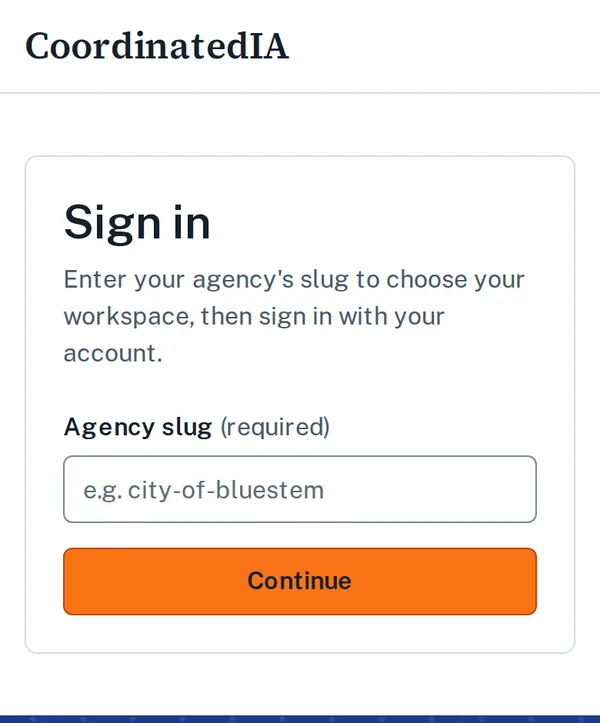
The sign-in screen on a phone: the page header with the product name, a card titled Sign in asking for the agency's slug to choose its workspace, and a Continue button.
The sign-in screen on a phone: the agency's workspace first, then the account and a second factor.

See whether CoordinatedIA fits your agency

CoordinatedIA is in early access, and agencies are invited by request. Tell us about your agency and we will be in touch. To see what a complainant sees first, file a complaint with the fictional City of Bluestem; it needs no account.

Screens on this page are of the City of Bluestem Police Department, a demonstration agency; every person and event in them is fictional. CoordinatedIA is provided by Command Staff Ai and built with former command staff.